
In The laws of information chemistry I mentioned that my local high school uses a PDF file to publish the school’s calendar of events. Let’s look at some different ways to represent the calendar entries for Oct 6, 2010. First I’ll divide these representations into two major categories: “What People See,” and “What Computers See.” Then I’ll discuss how the various formats serve various purposes.
Category 1: What People See
Here’s a piece of the PDF file for the week of Oct 4, 2010.
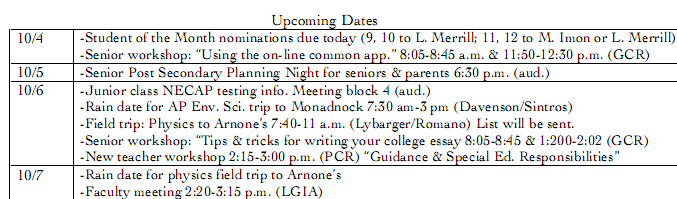
Fig. 1a: How the PDF looks to a person
And here’s how the same entries might look in Google Calendar (or in any other calendar program).
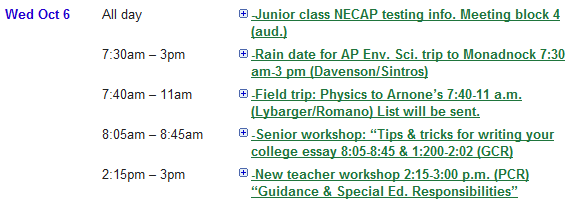
Fig. 1b: How the calendar looks to a person
Category 2: What Computers See
The PDF file describes fonts and layout in a highly structured way. But the calendar’s data — dates, times, descriptions — only lives in free-form text. Computers use it to enable people to read or print that text.
10/6
-Junior class NECAP testing info. Meeting block 4 (aud.)
-Rain date for AP Env. Sci. trip to Monadnock 7:30 am-3 pm (Davenson/Sintros)
-Field trip: Physics to Arnone’s 7:40-11 a.m. (Lybarger/Romano) List will be sent.
-Senior workshop: “Tips & tricks for writing your college essay 8:05-8:45 & 1:200-2:02 (GCR)
-New teacher workshop 2:15-3:00 p.m. (PCR) “Guidance & Special Ed. Responsibilities”
Fig. 2a: How the data in the PDF file looks to a computer
When your browser renders the calendar, it sees a mixture of HTML and JavaScript. Computers use that mixture to enable people to read, print, and also interact with the text.
<TR class="lv-row lv-newdate lv-firstevent lv-alt">

<TH class=lv-datecell rowSpan=5><A class=lv-datelink
href="javascript:void(Vaa('20101006'))">Wed Oct 6</A></TH>

<TD class="lv-eventcell lv-status"> </TD>

<TD class="lv-eventcell lv-time"><SPAN class=lv-event-time
onmousedown="Waa(event,'listview','YzFmYT...b2tAZw','20101006');return false;">All
day</SPAN></TD>

<TD class="lv-eventcell lv-titlecell">
<DIV id=listviewzYzFmYT...b2tAZw20101006 class=lv-zippy
onmousedown="Waa(event,'listview','YzFmYT...b2tAZw','20101006');return false;"></DIV>

<DIV class=lv-event-title-line><A style="COLOR: #1f753c" class=lv-event-title
onmousedown="Waa(event,'listview','YzFmYT...b2tAZw','20101006');return false;"
href="javascript:void(0)">-Junior class NECAP testing info. Meeting block 4
 <SPAN dir=ltr>(aud.)</SPAN></A> </DIV>
Fig. 2b: How the HTML looks to a computer
A calendar application or service that knows how use a standard format called iCalendar will receive a structured representation of the data. It relies on that structure to identify, recombine, and exchange the dates, times, and descriptions.
BEGIN:VCALENDAR
PRODID:-//Google Inc//Google Calendar 70.9054//EN
VERSION:2.0
BEGIN:VEVENT
DTSTART:20101006T113000Z
DTEND:20101006T190000Z
DTSTAMP:20101005T172506Z
UID:bccvmn5aooodokincjbgl8crc0@google.com
CREATED:20101005T161914Z
DESCRIPTION:
LOCATION:
SUMMARY:-Rain date for AP Env. Sci. trip to Monadnock 7:30 am-3 pm (Davenso
n/Sintros)
END:VEVENT
Fig. 2c: How the iCalendar feed looks
If a proposed format called xCalendar is approved as a standard, and is widely adopted by calendar applications and services, then calendar applications or services might also use that format to identify, recombine, and exchange dates, times, and descriptions.
<icalendar xmlns="urn:ietf:params:xml:ns:icalendar-2.0">
 <vcalendar>
  <properties>
   <prodid>
    <text>-//Google Inc//Google Calendar 70.9054//EN</text>
   </prodid>
   <version>
    <text>2.0</text>
   </version>
  </properties>
  <components>
   <vevent>
    <properties>
     <dtstamp>20101005T172506Z</dtstamp>
     <dtstart>20101006T113000Z</dtstart>
     <dtend>20101006T190000Z</dtend>
     <uid>
     <text>bccvmn5aooodokincjbgl8crc0@google.com</text>
     </uid>
     <summary>
     <text>-Rain date for AP Env. Sci. trip to Monadnock 7:30 am-3 pm
(Davenson/SintrosEvent #2</text>
     </summary>
    </properties>
   </vevent>
  </components>
 </vcalendar>
</icalendar>
Fig. 2d: How an xCalendar feed might look
Note that Fig. 2c (iCalendar) and Fig 2d (xCalendar) look very different. The iCalendar format uses lines of plain text to represent name:value pairs. The xCalendar format use a package of nested XML entities to represent the same data. Technical experts can, and do, endlessly debate the pros and cons of these different approaches. But for our purposes here, the key observations are:
- Fig. 2c and Fig. 2d contain the same data
- Computers can reliably extract that data
- Computers can transform either format into the other without loss of fidelity
- Computers can also transform either format into one that’s more directly useful to people — e.g., HTML or PDF
It’s also worth noting that this simple name:value technique, which has been the Internet calendar standard for over a decade, is broadly useful. Curators of elmcity calendar hubs, for example, follow a convention for representing name:value pairs as tags, attached to Delicious bookmarks, that have the form name=value. A similar convention enables any calendar event, made by any calendar program, to specify the URL for the event and the categories that it belongs to. In this week’s companion article on answers.oreilly.com I show how to extract these name:value pairs from free text.
A taxonomy of representations and purposes
Let’s chart these representations and arrange them according to purpose.
| What people see | Why? | What computers see | Why? |
|---|---|---|---|
Fig. 1a: pdf
|
To view and print |

Fig 2a: pdf
|
To enable people to view and and print |
Fig. 1b: html
|
To view, print, and interact |
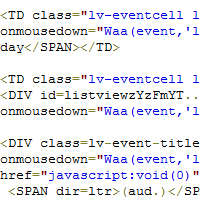
Fig 2b: html
|
To enable people to view, print, and interact |

Fig 2c: iCalendar
|
To enable data to flow reliably and recombine easily | ||
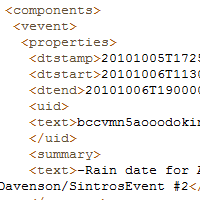
Fig 2d: xCalendar
|
To enable data to flow reliably and recombine easily | ||
To most people, all four items in the What Computers See column are roughly equivalent. They’re understood to be computer files of one sort or another. But when computers use these files on our behalf, they use them in very different ways. The first two uses enable people to read, print, and interact online. The latter two enable computers to exchange data without loss of fidelity, so that other people can read, print, and interact online.
The laws of information chemistry say that if we want to exchange data, we must provide it in a format that’s useful for that purpose. In this example the PDF and HTML formats aren’t; the iCalendar and xCalendar formats are. To most people it’s not obvious why that’s so. Our brains are such powerful pattern recognizers, and we know so much about the world in which the patterns occur, that we can look at Fig. 2a and see that the text clearly implies a structure involving dates, times, titles, and descriptions. Computers can’t do that so easily or so well.
Computers are, of course, getting smarter all the time. Google Calendar’s Quick Add feature is a perfect example. I used it to create the example shown in Fig. 1b, and it did a great job of parsing out the times and titles of the events. But that was only possible because I inserted the events, one at time, into a container that Google Calendar understood to represent Wed Oct 6. It wouldn’t be able to import the original free-form text that was the original source for the PDF file. No other calendar program could either.
The surprising difficulty of structured information
It’s counter-intuitive that computers don’t recognize structure easily or reliably. But so are many other things. For example:
You have $100. It grows by 25%, then shrinks by 25%. Do you end up with more or less?
You can live a long time without ever developing an intuition that the final amount is less. And you may be profoundly harmed because you lack that intuition. If you have it, you most likely didn’t acquire it all by yourself. Either somebody taught it to you, or nobody did.
Although our sample PDF file contains no structured representation of the events that it exists to convey, it does contain some other structured data:
| Title | Microsoft Word – weekly draft |
| Made_by | Word |
| Created_with | Mac OS X 10.4.11 Quartz PDFContext |
From this we learn that that calendar originates in Microsoft Word. Why Word instead of a calendar program? Available cloud-based applications include Google Calendar and Hotmail Calendar. On the Mac desktop where the document originated, there’s Apple iCal. If one of these alternatives were even considered, a number of valid concerns would arise:
- It’s cumbersome to enter data into a calendar program’s input fields; it’s much easier and quicker to type into a Word table
- The document doesn’t only contain structured data, it is also a textual narrative. Calendar programs don’t flexibly accomodate narrative.
- The webmaster knows how to post a PDF, but wouldn’t know what to do with dual outputs from a calendar program (one for humans to read, another for computers to process).
And if alternatives were considered, we could discuss those concerns:
- Yes, it is more cumbersome to enter data into a calendar program. But do we want students and teachers and parents to be able to pull these events into their own calendars? Do we want the events to also be able to flow automatically to community-wide calendars? If so, these are big payoffs for a fairly small investment of extra effort. And by doing things this way, we’ll demonstrate the 21st-century skills that we say our students need to learn and apply.
- Yes, it’s true that calendar programs don’t accomodate narrative. But we’re publishing to the web. We can use documents and links to build a context that includes: the calendar in an HTML format that people can read, print, and interact with; the calendar in another format that can syndicate to other calendars; narrative related to the calendar.
- Yes, but the webmaster needn’t even be tasked with this chore. Various tools — some that we already have and use, others that are freely available — enable us to publish the desired formats ourselves.
Since alternatives are almost never considered, though, the ensuing discussion almost never happens. Why not? Key intuitions are missing. Some kinds of computer files have different properties than others, and thus serve different purposes. Structured representation of data is one such property. If we are trying to put data onto the web, and if we want others to have the use of that data, and if we hope it will flow reliably through networks to all the places where it’s needed, then we ought to consider how the files we choose to publish do, or don’t, respect that property.
Nobody is born knowing this stuff. We need to learn it. Schools aren’t the only source of instruction. But they ought to teach core principles that govern the emerging web of people, data, and services. And they ought to cultivate intuitions about when, why, and how to apply those principles.
Related: